boarding school software
Most Android or Apple phones & tablets will interface seamlessly with your Boarding database making your operations truly mobile. Cloud based technology has simplified small and medium business operations by providing a secure and stable infrastructure free of frustrating local network issues. Not familiar with cloud technology? Don’t ask us, just Google “Cloud Technology”
IN A NUTSHELL
Try before buy is free on a pre setup sample school, all fully functional.
Like it - buy in. Setup is very simple! Once you have worked on the pre setup school you are practically a pro!
BSS does not try to interface with all of School Management Programs available and assure you it’s all automatic to transfer data - then after some frustration eventually advise a clunky manual transfer. We go straight for a highly simple and efficient planned manual transfer of data from full school records to our database. Any user with some spreadsheet experience or ideally your IT department can do this for you quick and easy!
Head of Boarding or designated official then manages the system, students and staff, intuitively.
Most functions are available to watch in the “Help Centre”.
It’s a fun, creative & timesaving DIY tool.
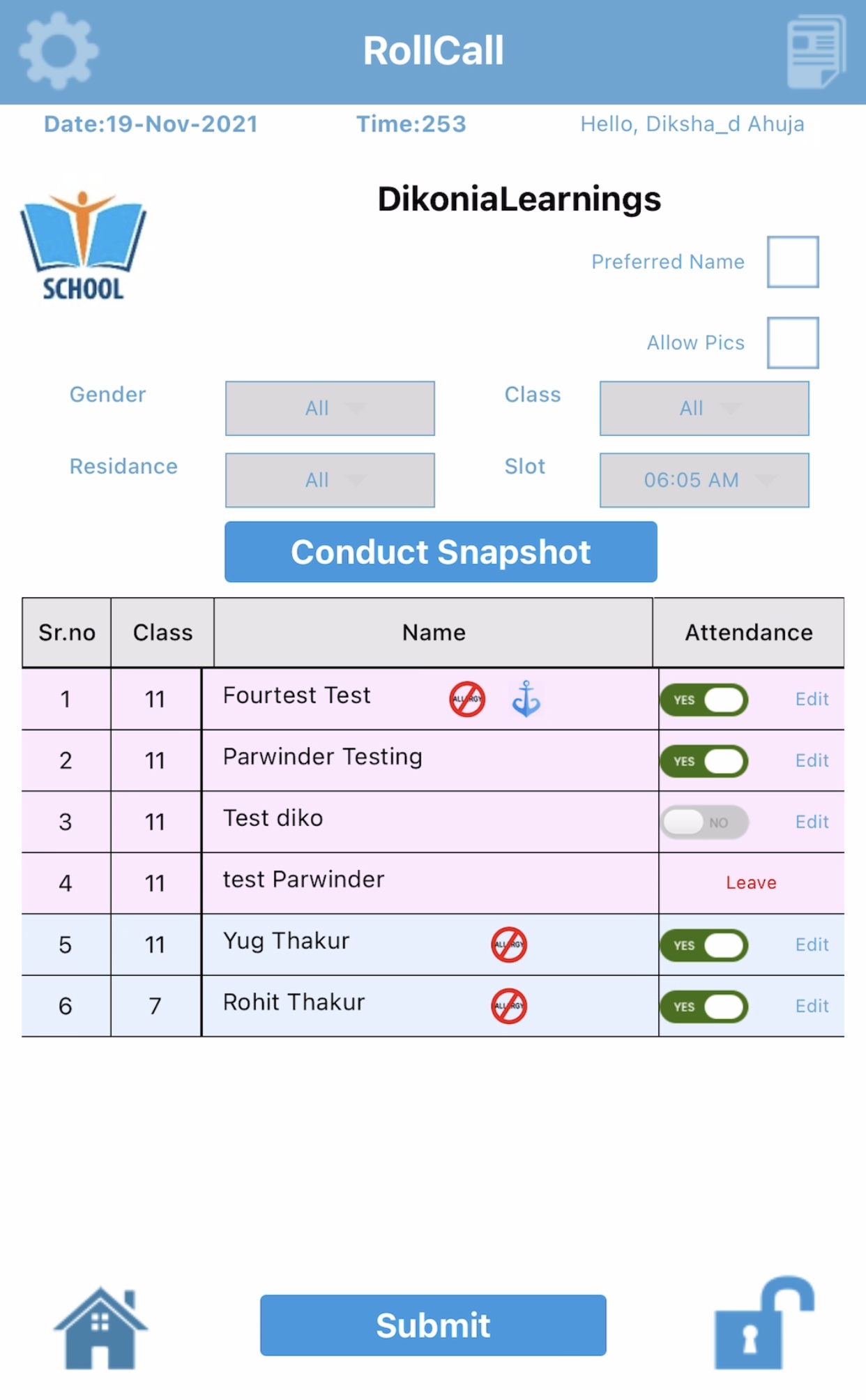
Boarding Staff use phone or tablet to conduct rollcalls from anywhere on campus in Realtime.
Attendance info immediately available to whoever needs it, management, catering, Health Centre?
Electronic check-in / checkout provides for accurate timestamping at selected stations.
Boarders Leave. Simple process manages students from Leave Application to returning from Leave. Parents & students have their App from which student initiates Leave request, parents approve, staff approve and student is checked out with all details of Leave recorded. Catering gets report & staff see visualisation on big screen.
Built in secure staff messaging facility.
Built in staff to student (predefined groups) push notification broadcast function for general or emergencies.
Daily Operational Diary (Staff), Pastoral notes & medical notes are easily input, shared and recalled, separately.
Staff can be reassigned to other dormitories or access rights changed remotely and simply.
Duty of Care & Due Diligence. Staff Training is time consuming but essential. Easily set up questionnaires that can be automatically assessed and recorded.
Collegiality between Boarding Schools is encouraged via the Resource Repository where any relevant files can be shared between staff and schools.
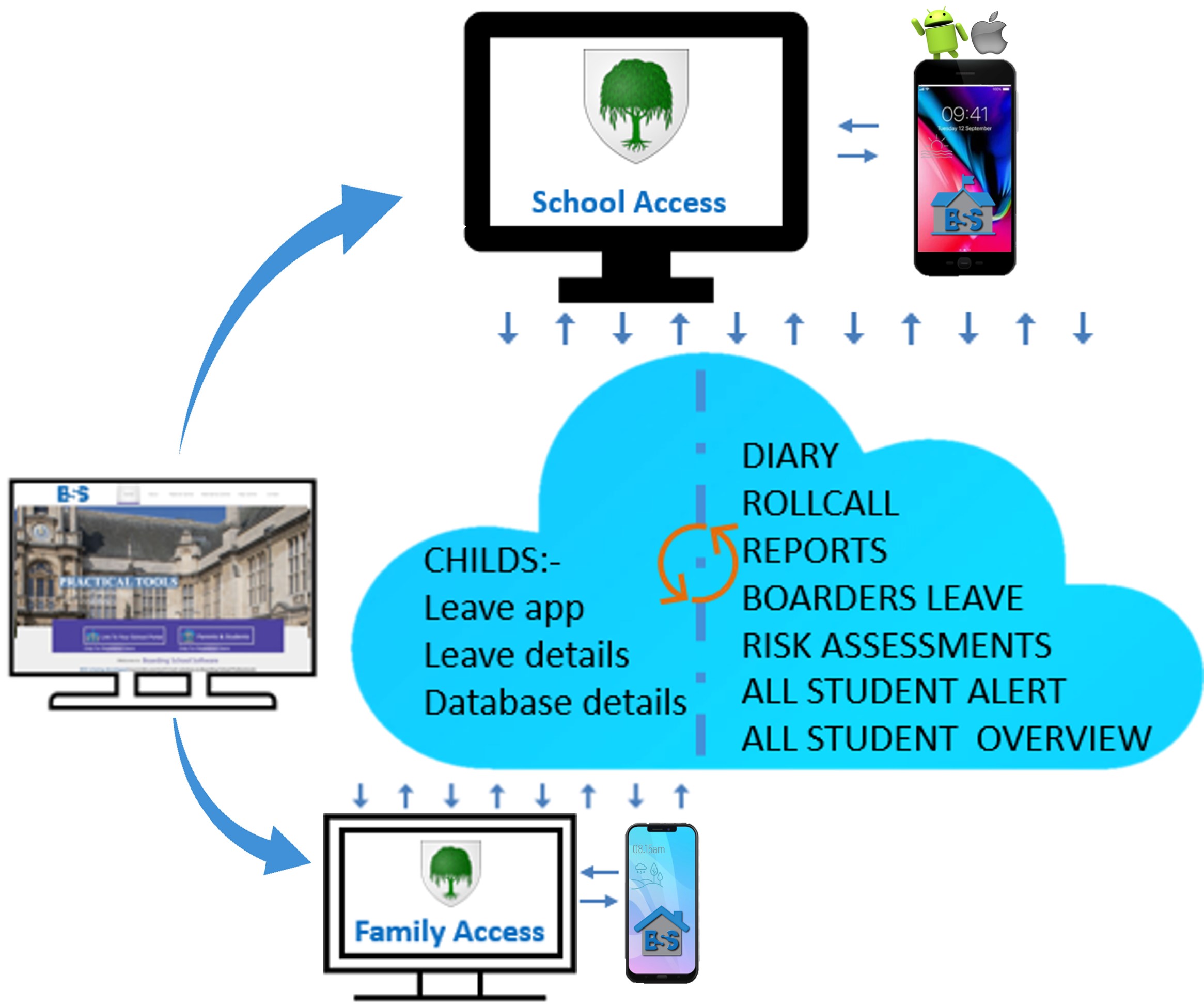

WEB APPLICATION

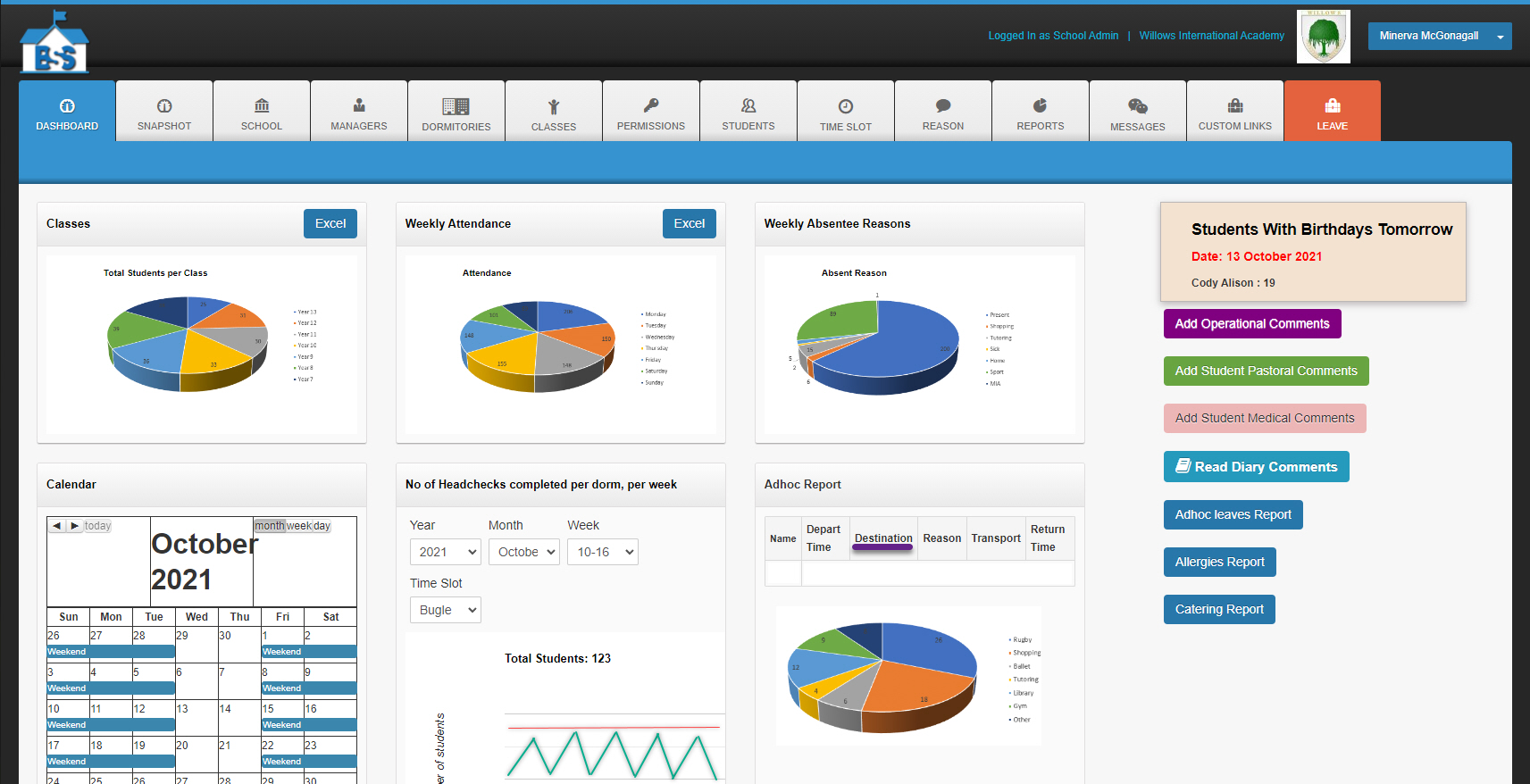
Dashboard with :-
- General statistics, breakdowns & multiple reports
- Calendar of events
- Operational diary automatically logs who enters info & when, also legacy search
- Pastoral diary automatically logs who enters info & when, also legacy search
- Medical diary automatically logs who enters info & when, also legacy search
Snapshot page :-Staff can display on big screen or a separate monitor, each students latest checkin so that you have a visual on who is where.
Staff criteria :- We like to identify your staff as Managers. Each manager has a profile with particulars,comments & permissions section.Credentials can easily be reset, changed, activated or deactivated.
Dormitories :-Or Residences. You add dormitory to system & include standard Timeslot (Rollcall) times.
Classes :- - You list the classes you have in your Boarding School and how you prefer to identify them. Some call them “Form 6” others use “Year 12” others say “Std 10” or “Grade 12” We like to talk your language.
Permissions tab :- - All Managers are listed here and using an interface of checkboxes the Head of Boarding decides which managers have access towhich information and functions on the apps.
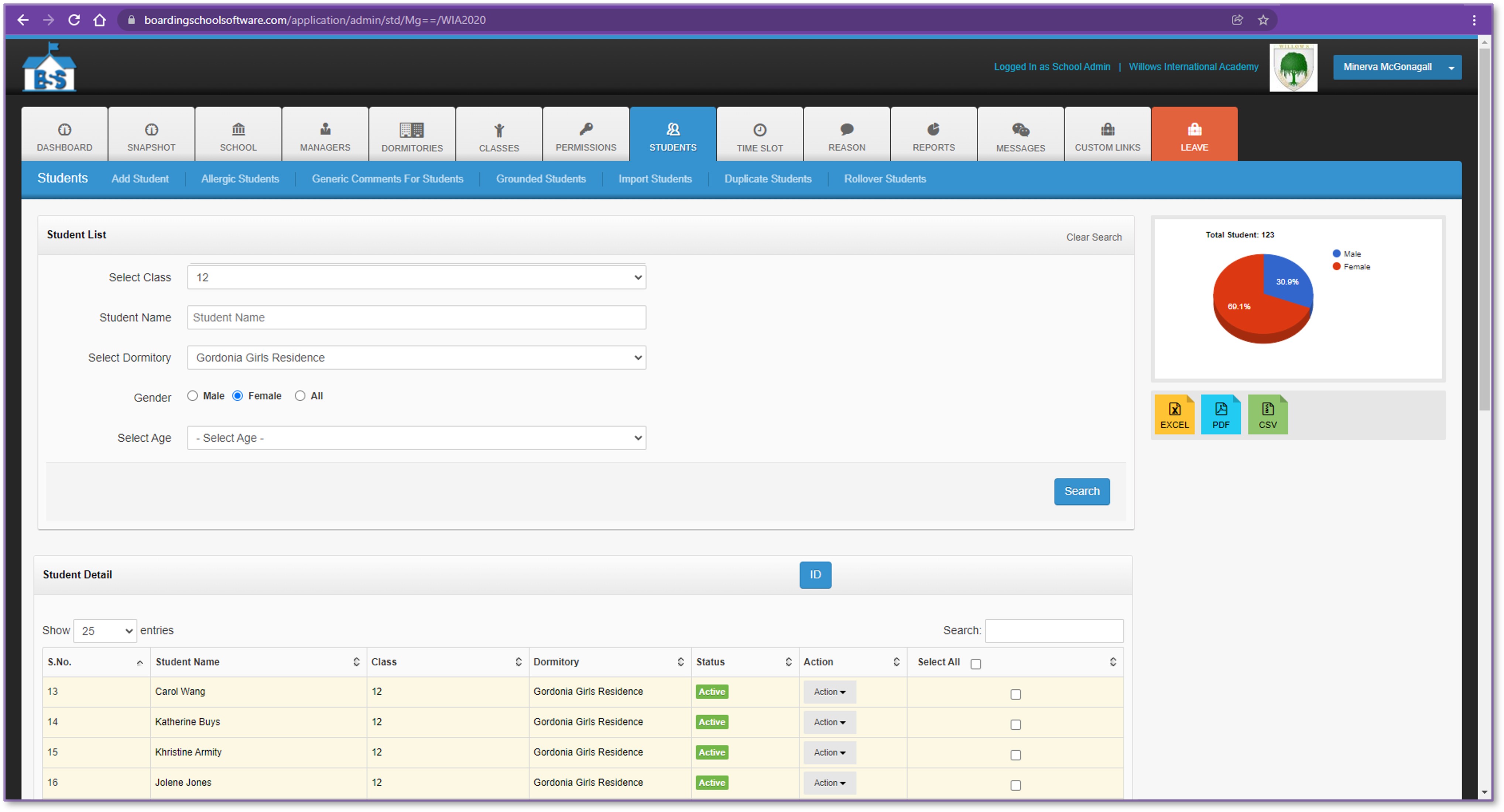
- Managers can easily be assigned to other residences or be promoted at short notice, remotely.Students tab :- Where the magic happens!
- Callup student listings by age, class, gender, residence or hair n eye colour. These listings can be downloaded in various formats to suit your needs.
- Add or remove Boarders from the system - happens here. 1 at a time or in batches.
- Photos of Boarders have to be added manually at this stage - sorry.
- All Boarders credentials are here and include parent contacts, information for apps, approved Hosts, leave history, attendance history.
- Student mobile numbers are added by managers or and the students themselves.
- Print out a customised temporary School Student Identity for your student who has mislaid his ID card just before leaving for the airport.
- Leave listing, students with allergies, grounded students & general notices on individual students, just click the button.
- Hair & eye colour - Uuuuh, we removed that function. You may add it manually if you wish.Time Slots & Labels :- Head of Boarding will include each possible Timeslot for a Rollcall that all dorms could possibly want and they will give it a name, a Label Name. Then it’s up to the respective Dormitory Heads to select those applicable to their particular dormitory, and apply them.
Reasons :- The fun part! Head of Boarding will decide a list of possible “Reasons” that students may be absent or missing from Rollcall. Add them to the system and choose an appropriate icon (for graphic effect) from a bag of icons or create your own icons. There is one, locked in, “Reason” that is MIA (Missing In Action) If a student is marked MIA the apps automatically send an email alert to Head of Boarding and highlight it in the reports. This can be changed when your MIA turns up.
Custom Links :- Well this one you may or may not use, it’s not necessary but on occasions, might find it useful. What it does is - if you as Head of Boarding become aware of an app in one of the App Stores that you want all your Boarders to use, you simply paste the link into this tab and it will appear as a link on the Boarders phones when they next log into the Boarding School: Family App. They can then follow the link and download it just as one would with any other app in the App Stores.
Messages tab :- Customisable messages can be created by the Head of Boarding. These messages appear at specific stages of the Boarders Leave process. Boarders have to acknowledge they have read the message. It might read "You must always represent the school in an appropriate fashion and let us know if you are going to be late on your return so we don’t have to start calling you, to find out where you are!"
Boarders Leave Tab :- This opens up the process of applying for Boarders Leave. Leave Application may be completed by a Boarder, from their “Boarding School: Family” App or it can be done by one of the dorm managers, for the Boarder. In each case the Leave must be “approved” by either one or two levels of Manager. Further to this the ‘Leave’ dashboard shows new leave requests, as well as students due to return & those overdue on returning. Adding a new Host for a student may take one to two minutes (because you require lots of details) but once the Host is added for a student, the process of applying for Leave is quick - like click, click, click! Parents also log in on the “Boarding School: Family” App and approve the leave application from their perspective.
Family Access :-This interface required parents and students to log in with their separate credentials. It holds basic information for families to check their personal information for correctness and allows leave details to be activated and processed.
BOARDING SCHOOL: STAFF APP

Introduction
The app for staff which interfaces with the web application, above. Available for lovers of Android or Apple devices. Once your Director of Boarding adds you to the system you will automatically be mailed your logon credentials - login, the system will greet you and you start operating. Pretty sweet hey!
Current Functions
Rollcall
We have made this as user friendly as we possibly can. Tap the icon, make your selection according to what group you intend to check for attendance and hit Go! You can fly there pretty quickly if you know all your students. You might not be familiar with all the students, double tap & the app will give you a picture of the student, can also display info like allergy status, grounding status, general info on the student and importantly recent rollcall history - just in case student is missing so it’s easier work out where they might be, history helps!Permissions
Normally for Director of Boarding or senior staff but from the app you can grant various staff permissions to access groups of students they normally do not have access to. You do not need this too often, but when you do - You do!Meal Controls
Quick access to numbers of students for meals. Shoot the document off to catering or whoever needs the info.Allergy Report
Group the report by residence, age, gender, class or just of an individual student.Staff Alert
An operational messaging system that circulates to staff when they are logged on or as they log in, on duty. Ensures staff on duty are all operating with the most up to date operational information regarding Boarding students on their shift.Student Alert
You have a crisis on campus - your Boarders are all over! Shopping, sport, library and between venues on campus. There is no other way but this Alert! A push notification that messages all your students, or groups, with this app. Keep them safe and away from the danger until it’s safe. It is up to the Director of Boarding how much this facility is used, or tested!
BOARDING SCHOOL: FAMILY APP

Introduction
The app for families (Boarders & Parents) which interfaces with the web application, above. Available for specialists on Android or Apple devices. Once the Director of Boarding or administrator adds students to the system the students and parents will automatically be mailed separate logon credentials. They each have access to different information and features. They can log in, change password start operating. Too cool for school.
Current Functions
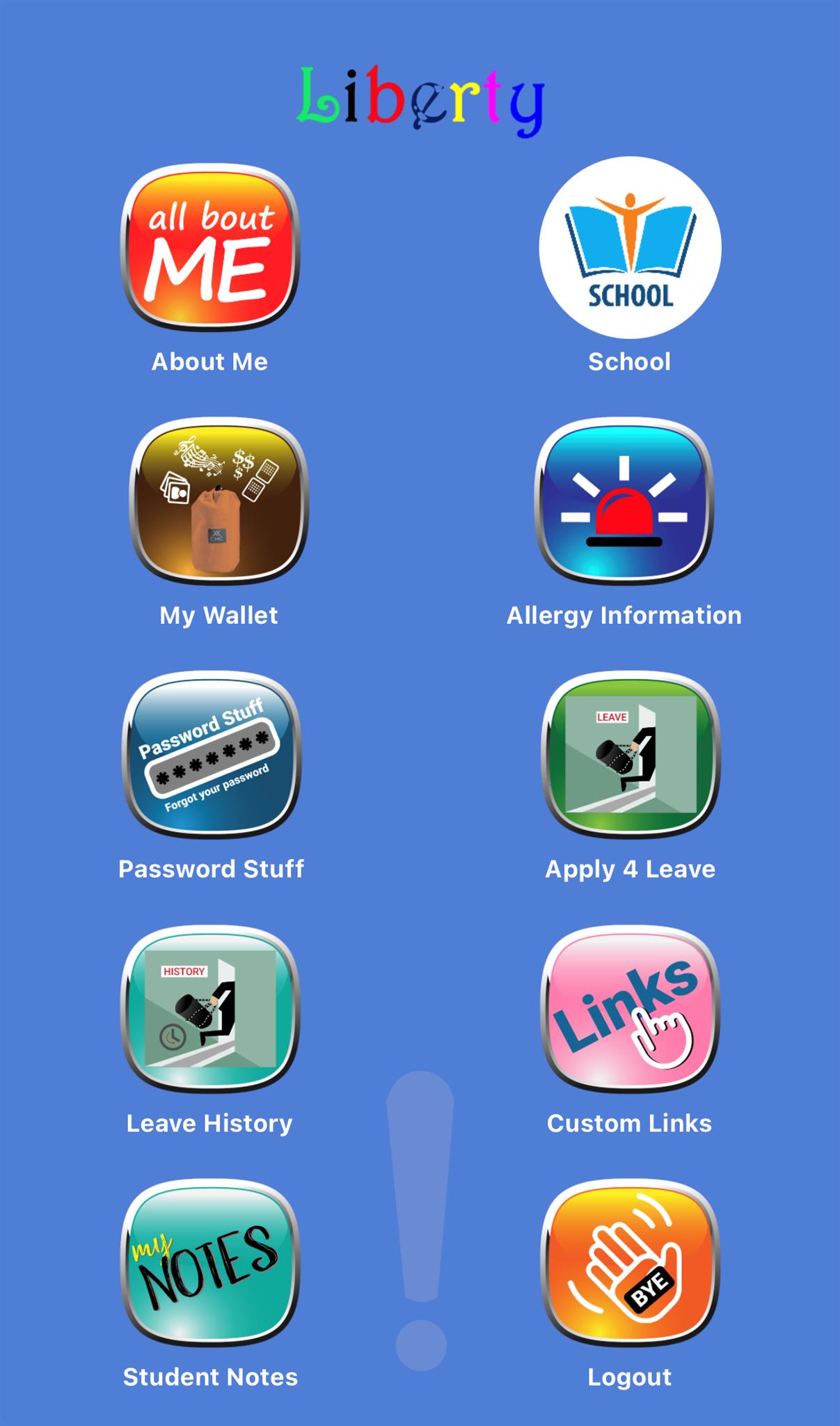
All About Me
Now ain’t that a thing! Carries the basics of the student in question, including a photo. Provides opportunity for student to check that their information on the system is accurate and they can upload their latest mobile number to the system.My Wallet
A small storage facility for a Boarders to store some personal multimedia elements in.Allergy
Displays info for parents and carers to check that this crucial information is correct and displays the way it should to provide maximum opportunity for the correct information to be available to viewers when it is required. When seconds count - this information can be accessed without opening the app!Password Stuff
As one would expect this can easily be reset by the student.Apply for Leave
The most important button of the whole system! Quick & simple. The process can be monitored by the student to see where the hold ups are, maybe Mom has not yet approved it! - After all, this is all about going on Leave!Leave History
Parents and students can check what Leave has occurred, when and with whom. This can be interesting at times!Custom Links
These are quite simply links to strategically selected apps that the Head of Boarding may choose to use, or not. For example may be a link to an app that has a particular study theme or an app that contains information about a special school visit in the near future. Any app anywhere on the internet could be linked to - if that is required by Director of Boarding or PrincipalMy Notes
This is a simple note taking application that merely provides opportunity for the student to make short notes of a personal nature, whatever that may be.
Security
Whilst no data is ever 100% secure on the internet – regardless of security, we employ encryption and password security to protect the integrity of data. Similarly we also contract our Service Provider to employ their Server Side Security as an added layer of security for our software and your data. Our Service Provider Connection is authenticated with industry leading SHA-2 & 2048-bit Extended Validation Encryption.
Registering your expression of interest from our Contact Us page. We check your association to your school, only as a security measure. You will then be able to access the demonstration site which is pretty much, a fully functioning ‘Boarding School’ There is no obligation or time limit and you will be free to download the Apps from Google Playstore or iTunes and work with the system. Getting this ‘live’ school to work with is all you need to train yourself and your staff.